New paper insurance claim form - designed to accept the National Provider Id or NPI
The 08/05 form replaced the 12/90 form. The 02/12 form will replace the 08/05 form. The primary advantage of the 02/12 form is that it accepts ICD10 codes (it also will accept ICD9 codes) If you wish to begin using this form, you should first use up your stock of the old form and make sure you have plenty of the new forms on hand before doing anything to change the program. All versions of Stratford software later than 9.4.8334 support the 02/12 form.
You should be aware that changing the program to format a new form is not a thing which you should experiment with using your real patient data. You should use the trial version which is built into every Stratford program including yours. The trial version has always been included with every copy of Stratford software. When you create an insurance claim, various flags are set inside the program to prevent duplicate claims from being created. This means if your form is not formatted correctly for the paper claims that you are using, you cannot re-create those claims automatically. Of course, you can always demand the claims if you know the patient and the transaction dates. We advise you to use paper claims that you get from Stratford if you are not certain. We advise you to have a recent, verified backup before you make any changes like this. Even better, transmit your claims and forget the paper claims.
Here is how you setup your program to format for the new form.
From the main directory select #8 "File and system management"
Next select #7 "EDI Related Information programs"
Last select #3 "Insurance/EDI Form Control Settings"
Next put in the form type that you wish to change to the new form. Most people use the form type "564" for Medicare. You should then see a screen like this:
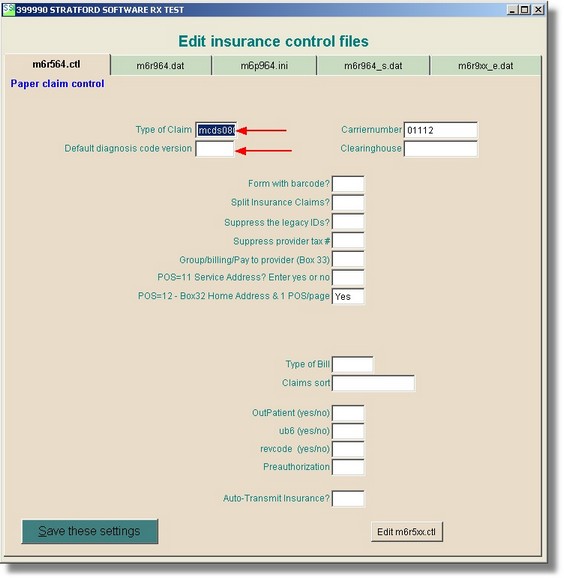
In the text box labeled "Type of Claim" you can right-click and select mcds 0212
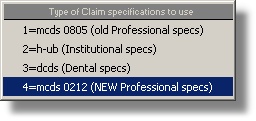
That is all there is to it. Your forms will now be formatted differently. Be sure that you enter the NPI for the rendering provider, billing provider and the referring provider screens or you will not see it on the new forms.
Note: Only the 02/12 form will allow ICD9 and ICD10 codes to print correctly. When you want to begin printing ICD10 codes on your 02/12 form, right click on "Default diagnosis code version and select ICD10. There is an automatic code conversion utility built into the Stratford software that will convert the diagnosis code that you entered in the patient account into the correct version that is required for the payer that accepts this paper claim. You have control with this simple, single step. There is no need to change the diagnosis code in the patient account.