| 1. | First you must be in the System Management Directory. To get to this screen you must select File and System Management from the Accounts Receivable (main) directory. |
| 2. | From this screen you must select Provider, Payer, Employer, Refer, UPIN, Provider, etc. This will take you to the Lookup name maintenance screen. |
| 3. | From this screen you must select Maintain the Provider Names. This will take you to the Lookup Insurance Providers Screen. Here you must click on the Provider you wish to edit and then click the Edit/Revise button. |
| 4. | You will be taken to the New Insurance Provider Entry screen. Here you can make any necessary changes. When you are finished click the Save this Information button. |
| 5. | Note: if you bill Medicare and the place of service is 11 (office visit) you must put a facility name and address in box 32 on the CMS form and in the correct segment in the ANSI X.12 EDI claim format. You can enter the facility that you want to use on this screen. |
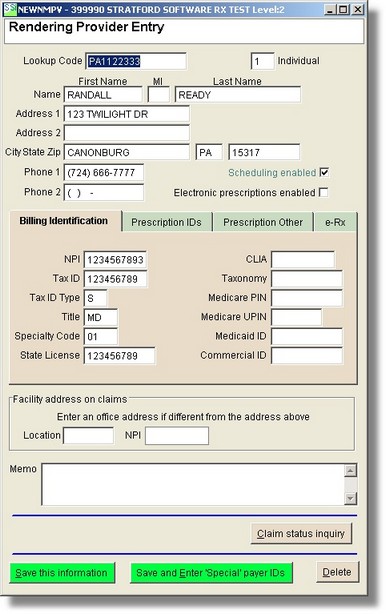
Note the button labeled "Save and Enter 'Special' payer IDs". This is where you would enter a code/ID that a payer requires for this provider when there is no text box to enter it on the screen above.