There are at least 3 'control' files that determine how your insurance claims will print on paper and transmit to the payers. This section gives some directions for some of the things you can do to change/control the way your claims are created.
From the main directory select #8 "File and system management"
Next select #7 "EDI Related Information programs"
Last select #3 "Insurance/EDI Form Control Settings"
Next put in the form type that you wish to change to the new form. Most people use the form type "564" or "5MCARE' or "5NHIC" for Medicare. You should then see a screen like this:

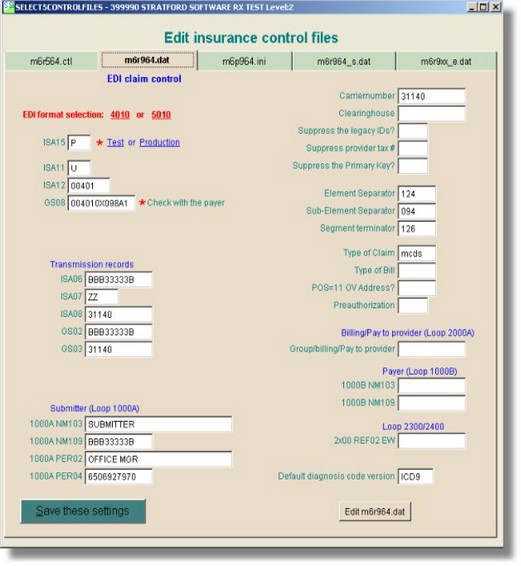
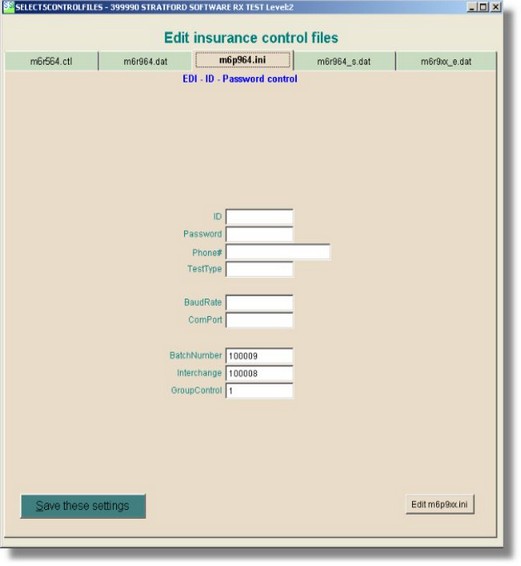
Those are the 4 pages on this screen. The 4th page is for future expansion.
Some payers want to see a 'service address' in box 32 on the CMS 1500 claim form when the place of service is the office. Here is how you can force that:
On the 1st page of the insurance control screen:
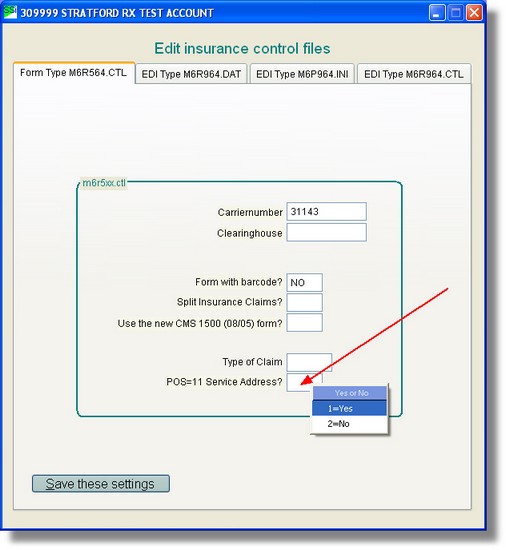
Type 'Yes' in the box labeled 'POS=11 Service Address? - or you can right-click and select 1=Yes from the 'shortcut' menu.