Data file change audit
records all changes to the selected data files
Never make any changes in your account set up without first making a complete backup of the 'ssiwin' folder and all sub-folders. That will ensure you can restore you account. It is best that you do not even read the rest of this topic without FIRST making a complete backup.
Over the years we have had requests for some kind of report that lists all the recent changes in the data files - a 'change audit'
That is now available on versions 9.4.8373 or later. You log in as ADMIN and there is a new selection in the menu #8, #3, #8.
This is non-destructive, that is, it only reads the file. Since you have the ability to make programming changes, we cannot stop you from destroying your data.
It creates a new sub folder (ex: C:\Stratford\ssiwin\399990\StratfordAudit\) and puts the files there. This is completely customizable. There is a sample/template (working) audit which will be set up with that new menu selection. If you make that menu selection, it will determine if you already have the audit set up and give you the option to disable the audit.
For example, you want to record the changes to the patient demographics in m6nmpt. When you change the address, a new record will be put in a file named StratfordAudit_20130827_m6nmpt.dbf. You will see the new record that was entered in your regular m6nmpt plus a new memo field with the actual changes including the field name, old value, new value. You can modify these files anyway you want. We tried to put all the data tables that most people would want in the template setup.
1. This is 1 part of a 3 part system necessary to do a 2 way interface with one of the many certified EHR programs.
2. A second part would be the raw-xml import that we have had for many years.
3. The third part would be a custom program (every EHR is different) that would read the audit and create an HL7, xml, etc, whatever the EHR requires for import. It would take whatever the EHR program exports and convert it into xml suitable for our existing xml import. It would write a mark of some kind on each record (the cOpen field) that was read so it would know when all audit records had been used. When all records are used, that file can be deleted. Remember the Audit will create a new file each day. You will not see a file for any data table unless there is:
1. D = delete - an existing record is deleted
2. I = insert - a new record is added
3. U = update - an existing record is changed
In addition this third program would be responsible for cleaning up the StratfordAudit folder so it does not accumulate a large number of old files. We thought about having the reorganize program delete all the files that are over 90 days old. If you audit the transaction files, you could probably accumulate a lot of large audit files.
This could degrade your system performance 2-3% (just an estimate) but that would depend on your computer, memory, etc.
Stratford does not do custom programming (at least not at no cost) and we do not have spare resources to teach programming. We do have clients that have done a lot of quality, technical work importing/exporting from the Stratford database. We could possibly put you in touch if you send in-depth information about the project you are interesting in creating.
Below is some information for enabling the Stratford Audit. As we get feedback, we will continuously expand this topic.
First log in with the ADMIN LoginID:

Then select your folder. You may NOT set up the StratfordAudit in the administrative (300005) account). Select the account you usually log into.
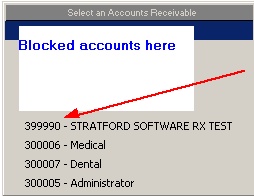
Select #8 from the main menu.

Then select #3 for Reorganize and utilities. Then select #8. You will not see #8 unless you logged in with ADMIN as described above.

Then select #8 and you will see the menu with the Stratford Audit selections:

Select #1 and you will see the screen below: (#2 Maintain is described below)
You will get a warning/description about what will happen if you select Yes
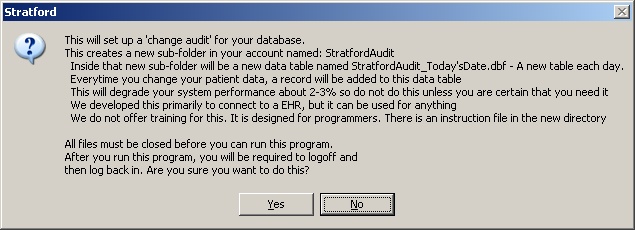
If you select Yes the sample/template Stratford audit will be set up.
There will be 3 new files (and the compiled versions) in your a/r folder: ex: C:\Stratford\ssiwin\399990
stratfordauditsetup.ini
stratfordauditsetup.prg
stratfordauditstoredprocedure.prg
You may revise these files. Never make any changes in your account set up without first making a complete backup of the 'ssiwin' folder and all sub-folders. That will ensure you can restore you account.
They are designed by programmers for programmers. Be careful. You can destroy your data. Please contact Stratford support at support@stratfordsoftware.com with a description of what you want to change.
After the audit template is setup you will be back at the login screen. This time you MUST NOT use ADMIN. ADMIN is for Reorganizing the ssipub folder and a few low-level functions. If you do any data-entry while logged in as ADMIN, you could destroy your data as many or most of the built-in edits are not working.
Now go to a patient account and make a change. For example, we changed the last name. We added the letters "NEW" after the last name. Press Save
Now look in the new folder that was created for the audit: C:\Stratford\ssiwin\399990\StratfordAudit
You will see 2 files:
1. StratfordAudit_20130828_M6NMPT.dbf
2. StratfordAudit_20130828_M6NMPT.FPT
Note that the data table file that was changed is part of the filename. You also see the date the file was created. Every day that you do any data entry a new file will be created. The DBF file has a record that is the same as the changed record. The FPT file is a 'memo' file that has a record of the changes.

[CLNAME] is the name of the field in m6nmpt. When programming it is referred to as m6nmpt.cLname
Old:JONES~ is the 'old' information before you changed it. 'JONES'
New:JONES NEW~ is the 'new' information after your change. 'JONES NEW'
If you change other fields, you will see them listed here. If you change other information in other files you will see new files with that information. For example, if you change/add/delete a patient's insurance you will get these files:
1. StratfordAudit_20130828_M6PTIN.dbf
2. StratfordAudit_20130828_M6PTIN.FPT
As you can probably imagine, this is a very large collection of programs and is far more complex than the description about suggests. However, we have purposely designed it to be easy to work on if you are committed and have the required technical capability.
Note:
The fields in the 'change' file are the same as in the original data table that holds your patient information.
In addition there are 7 additional fields:
cCngTable has the table name (same as in the file name)
cCngUser has the workstation ID that entered the changed data
cCngdattim has the date and time this audit record was created
cCngType has D (for delete), I (for insert), U (for update)
cCngNew has O if Old, N if New
cCngOpen Not used. We planned to use this contain a mark showing that this record has been read/used
mOldNew a Memo field that contains all the changes as described above
Now see the Stratford Audit Maintenance screen: (Select #2 below)

Select #2 Maintain which files are audited and see this screen:

After you make ANY changes, be sure to press the 'Save this information' button or your changes will not be activated until you you press #1 on the setup menu.
On the left side you will see files that WILL NOT be audited. On the right are the files that WILL be audited.
--- ****************** 'share' subfolder files
m6nmpt -- patient demographics
m6nmptal -- patient allergies
m6nmptph -- patient phone and email
m6apptappt -- patient appointments
m6nmgu -- patient guarantor
m6nmem -- patient employer
m6nmpv -- provider records
m6nmrf -- referring records
m6nmsp -- supervising records
m6nmsu -- subscriber records
m6nmco -- insurance/payer records
m6nmlb -- lab records
m6nmfc -- facility records
m6autr -- auto transaction records
m6veac -- billing account records
m6verc -- recall records
m6vers -- research records
--- ****************** 'data' subfolder files
m6ptp1 -- recall record
m6ptin -- patient insurance records
m6pthc -- medical insurance claim records
m6ptub -- ub institutional insurance claim records
m6ptad -- dental insurance claim records
--- other patient information, probably not wanted by most
m6pttrch -- transaction charge records REMOVE * to activate
m6pttrnc -- transaction non-charge records REMOVE * to activate
m6ptdx -- Patient diagnosis (on the main patient screen - 4 dx codes on the 3rd 'miscellaneous' tab at the bottom)
m6ptif -- Patient 'other' information (on the main patient screen - 4 info on the 1st tab at the top)
m6ptnote -- Patient emr notes (from the main patient screen select the EMR button)
m6ptp2 -- Other patient information (on the main patient screen - 4 memos on the 1st tab at the bottom)
--- below most probably will not want
m6clmi -- Claim creation info (not accessible by users)
m6clmt -- Claim transaction creation info (not accessible by users)
m6ptch -- pm160 claim questions
m6ptdf -- doctor's first report claim questions
m6ptwc -- Workman's comp claim questions
m6ptnsga -- ambulance claim questions
m6ptnsgc -- chiropractor claim questions
m6ptnsgd -- nsgd GDX Certification - DME claim questions
m6ptnsgu -- nsgu GU0 Certification - DME claim questions
m6ptnsgx -- nsgx Oxygen claim questions
m6ptnsvi -- vision claim questions
--- obsolete below, be careful, they are probably not well supported if at all
m6ptnscb -- (obsolete)
m6ptnsha -- nsha Wisconsin Chiropractor Information (obsolete)
m6ptnscb -- nscb Legal Representative (obsolete) was in the national standard format. Not supported.
m6ptrc -- patient recall information
m6ptnscr -- nscr Home Health Care (obsolete)
m6pttr -- patient transactions (old non-open item - obsolete)