It is very important to realize that you cannot install the update
while you are using the Stratford program.
If you are using a network, all users (including you) must leave the Stratford program now
If any computers are using the Stratford program while you install an update,
you will get errors.
Licensed users with a pre-paid support agreement may obtain updates online. Updates are very large files - greater than 120 MB - so a high speed Internet connection is required. If you have a dial-up connection, the server will time-out and disconnect. To find out if there is an update available for you, go to the Internet browser.
From the main directory select # 7 then # 5
You should see the Stratford main web site.
If you do not see the Stratford main web site, you are not connected to the Internet and/or there is some problem that prevents you from accessing any of our servers. You will not be able to check your update status.
Assume that you do see the Stratford main web site: Here is an example of what you might see (we change the web site occasionally so your image may be different)
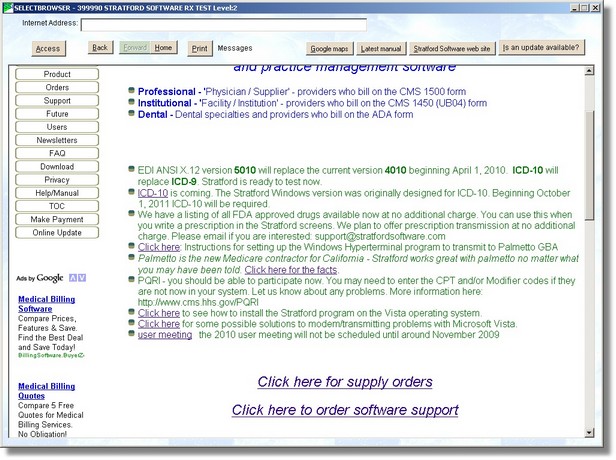
If you press the button labeled 'Is an update available?', the program will access the Stratford web site and find out what update version is available. If you have the latest version you will see a message like this:

If there is a later version available, you can download it the usual way.
The best, fastest way to update your Windows version of Stratford software is with the Stratford Access utility program. You will have a shortcut link under Start | Programs | Stratford Update Download. It can automatically detect if your support subscription is current and will download the update with no ID or password. You can use this utility 24/7/365.
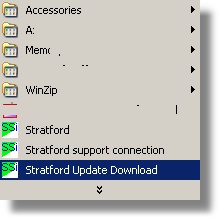
Here is the screen you will see. Enter your account number from your Stratford monthly billing statement.
Please also see the topic named 'Downloading the latest updates' in this same manual section for more information about using the Stratford Access utility.

Here is an example of what you might see if your regular software is up to date. You can see that the button labeled 'Download the software update' is disabled. The software automatically detected that you do not need an update.
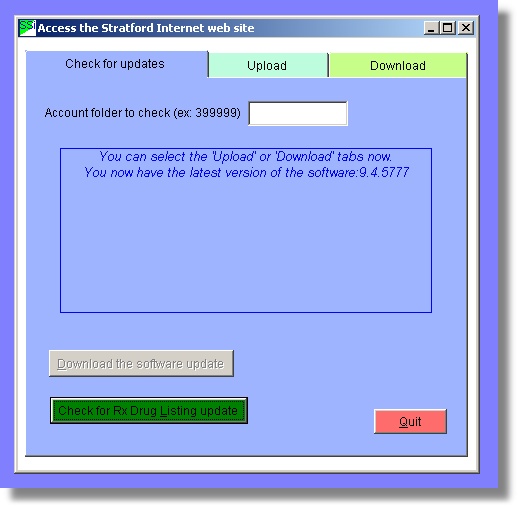
Updating this way is so automatic that there is not much more to show.
This utility can also be used for other purposes. You can send files to Stratford and receive files from Stratford - all without entering an ID or password. At the same time, all files being transferred over the internet are encrypted, and we believe, meet the HIPAA standards for privacy.